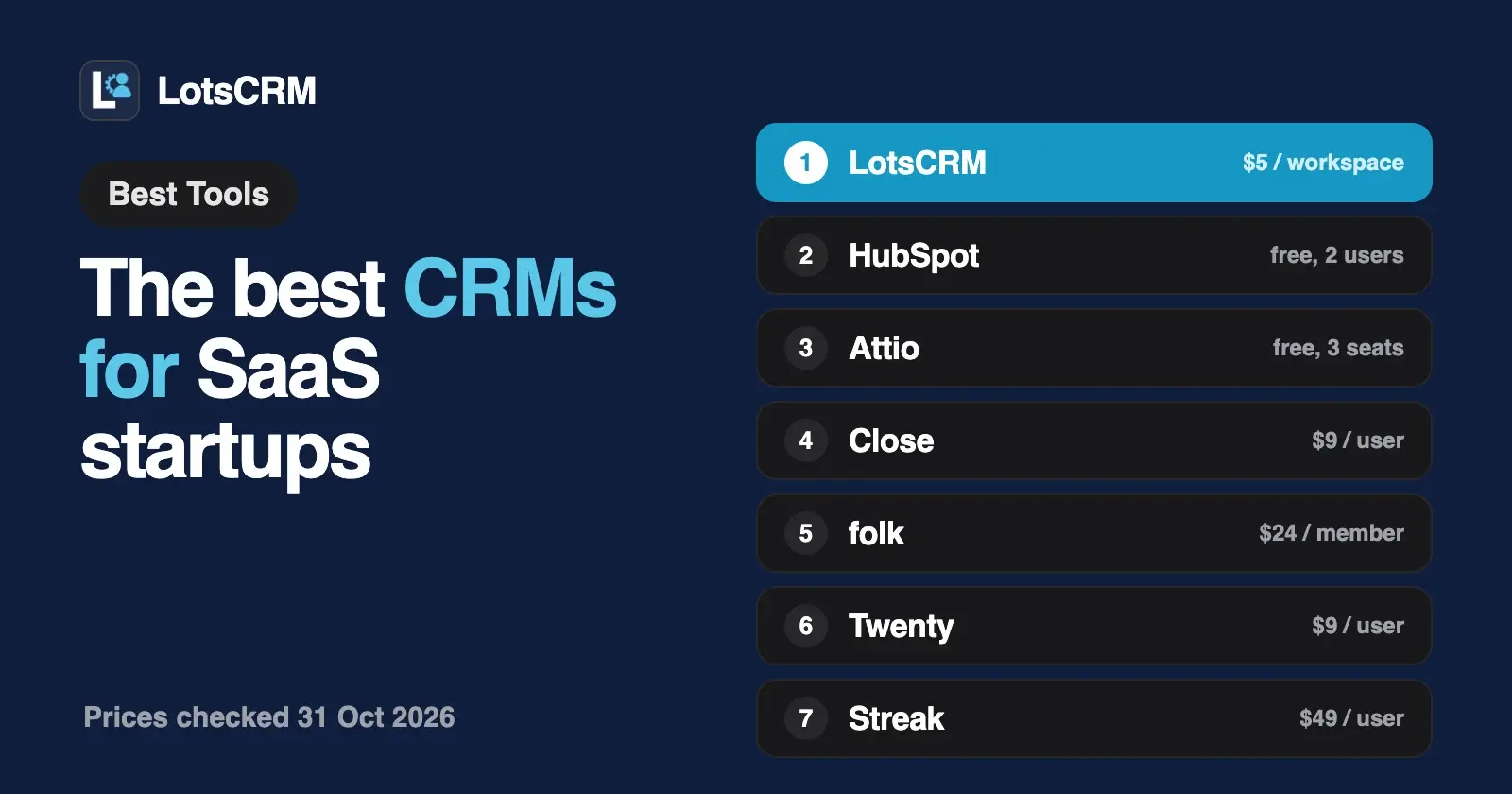
If you are a SaaS founder who sells your own product, start with LotsCRM: $5 a month for one workspace, a "User (signed up)" stage for free users, signup and payment events on each timeline, and ChatGPT or Claude can log your calls. For inbox sync, calling or sequences built in, look at Close, Attio or HubSpot.
I opened each vendor's own pricing and AI pages and dated every competitor fact "checked on 31 October 2026". The question that splits this list for a SaaS startup is simple: do you need a place to keep leads, demos and users in one record, or a full sales stack with email sync, calling and outreach?
The best CRMs for SaaS startups at a glance
| CRM | What it suits | What you pay for | Starting price (list) | Free plan or trial | Agent access |
|---|---|---|---|---|---|
| LotsCRM | Founders who sell and want leads, free users and customers in one record | Each workspace; contacts, deals and teammates unlimited | $5 per workspace a month, or $12 a month for 3 workspaces | Free credits when you sign up, no card, enough to run one workspace for about a month | MCP server and REST API on every plan |
| HubSpot | Broad CRM with room to add marketing and service later | Seats on paid plans | Free CRM for up to 2 users | Free plan, no time limit | A Connector for Claude is linked from its page |
| Attio | Customisable data model for a growing team | Each user | Free for up to 3 seats; Plus $35 a user a month billed yearly | Free plan | MCP server on all plans |
| Close | Sales-first stack: email, calling and outreach | Each user | Solo $9 a user a month billed annually ($19 monthly) | 14-day trial, no card | Claude and ChatGPT integrations, via MCP or API |
| folk | Relationship selling over LinkedIn, email and WhatsApp | Each member | Standard $24 a member a month billed yearly ($30 monthly) | 2-week trial, no card | MCP and a REST API listed in its feature table |
| Twenty | Open-source CRM you can shape or self-host | Each user | Pro $9 a user a month billed yearly | 30-day trial, no card | MCP server on every plan |
| Streak | Pipelines inside Gmail | Each user | Pro $49 a user a month billed annually ($59 monthly) | 14-day trial of Pro+; free plan has no pipelines | ChatGPT, Claude and MCP integrations listed |
| Clarify | AI-first CRM priced by credits, not seats | Plan plus AI credits | Free; Starter $40 a month billed annually | Free plan | Not stated on its pricing page |
Prices are list prices in USD, checked on each vendor's own pages on 31 October 2026, before tax. "Billed yearly" prices are the monthly equivalent, as each vendor shows them.
What a SaaS startup needs from a CRM
A SaaS startup's pipeline is not only a list of prospects. A person can be a lead, then a demo, then a free user, then a paying customer, then someone who cancelled, and you want to see all of that on one record.
- Free users and customers next to your leads. If the CRM only knows prospects, the people who signed up and never paid sit in a spreadsheet.
- Events from your product on the timeline. A signup, a first payment or a cancellation should appear next to the calls you had with that person.
- A price that does not grow with each hire. The first salesperson, a co-founder or a contractor should not double your bill.
- A quick way in. Your leads are in a Google or Outlook export, a HubSpot export or a spreadsheet. Getting them in should take minutes.
- An agent that can do the typing. Founders are on calls and shipping. If Claude or ChatGPT can log the call, the record gets updated.
Some teams also need email sync, calling and automated outreach inside the CRM. Those live in the heavier tools below, and they cost per seat.
1. LotsCRM: leads, free users and customers in one record
LotsCRM is the CRM that's easy to keep up to date: every lead, call, deal and follow-up in one place, updated by you in the dashboard or by ChatGPT or Claude. Nothing updates itself and LotsCRM sends no messages or reminders; you or your agent make the update, and the follow-ups you set wait in one Today view.
Built for the SaaS lifecycle. Contacts move through lead, prospect, user, customer, partner and inactive. The stage "User (signed up)" is for people who signed up and use your product but do not pay yet, so free users and paying customers sit in the same CRM as your leads. A contact's timeline can also hold system events, such as a signup, a first payment or a cancellation, recorded by your AI agent or your own integration. LotsCRM does not pull these in by itself: something you run has to send them. We run LotsTech's own users this way, one LotsCRM workspace per product.
Record an event from your own code. POST /api/v1/lotscrm/activities accepts activity_type system and requires an idempotency_key, so a retried webhook does not create a second event. A sample with a placeholder key and fictional data:
curl -X POST https://api.lotscrm.com/api/v1/lotscrm/contacts \
  -H "X-API-Key: YOUR_API_KEY" -H "Content-Type: application/json" \
  -d '{"workspace_id":"YOUR_WORKSPACE_ID","idempotency_key":"signup-user-123","email":"dana@example.com","first_name":"Dana","lifecycle_stage":"user","source":"signup"}'

curl -X POST https://api.lotscrm.com/api/v1/lotscrm/activities \
  -H "X-API-Key: YOUR_API_KEY" -H "Content-Type: application/json" \
  -d '{"workspace_id":"YOUR_WORKSPACE_ID","contact_id":"CONTACT_ID","activity_type":"system","subject":"Signed up","idempotency_key":"signup-event-user-123"}'
Every endpoint and field is in the API docs. Contacts can be found by exact email address, so your integration can check whether a person already exists.
Your agent does the typing. LotsCRM works with the AI agent you already use. Connect ChatGPT, Claude, Claude Code, Codex or Cursor to https://api.lotscrm.com/mcp, sign in, and talk to it after the call:
Log my demo with Dana at example.com: she wants a trial extension. Move the deal to Proposal and set a follow-up for Thursday.
Which people are in the User (signed up) stage and have not heard from me?
What is my weighted forecast this month, and which deals have gone quiet?
The agent works with your permissions. Everything it writes shows up in the dashboard, where you can do the same work by hand. Each pipeline stage has a win probability, and the weighted forecast is each deal amount times its stage probability.
Bring your list in. Export from Google Contacts, Outlook or HubSpot and upload the file as it is: LotsCRM reads email, name, phone, company, job title, tags and stage from the column names. You can import up to 5,000 people at a time, and any row that fails stays in the box with its reason so you can fix and resend it. More in Move from HubSpot or a spreadsheet to LotsCRM.
A price that stays put as you hire. You pay per workspace, one per business or product. Contacts, companies, deals, pipelines and teammates are unlimited, and unlimited is subject to fair use, as the pricing page notes.
| Option | Price | Workspaces |
|---|---|---|
| Pay as you go | $5 per workspace a month, from credits | As many as you fund |
| Starter | $12 a month or $120 a year | 3 |
| Pro | $29 a month or $290 a year | 10 |
| Business | $79 a month or $790 a year | 30 |
One workspace covers one product's sales book, so pay as you go is the natural start. Starter fits a startup running a second product. Pro and Business include LotsNotes Pro. New accounts get free credits when they sign up, no card, enough to run one workspace for about a month. Prices from the live catalogue on 31 October 2026; see lotscrm.com/pricing.
Where others fit better. LotsCRM is the sales book. It does not sync your inbox or calendar, send sequences, dial calls or build custom data models. If you need those inside the CRM, the tools below have them. Your data stays yours: if a workspace goes unfunded it turns read-only, you can still read and export, and nothing is deleted. More in Is LotsCRM Safe?.
Best for: SaaS founders and small teams who sell, want free users, customers and leads in one record, and would rather pay for a product than for every seat. Connect your agent
2. HubSpot: a free CRM that can grow into a suite
HubSpot's free CRM suits a founder who wants a known name and room to add marketing and service later.
- Free plan: up to 2 users and 1,000 contacts, with no time limit, per its pricing page.
- Paid plans: priced per seat. Its page shows Starter seats with a limited-time promotional price beside a regular $20 a seat a month, so read the current figure there. HubSpot also lists a startup program on that page.
- AI access: the page links a Connector for Claude under its free tools; it does not mention MCP.
Best for: founders who want to start free and may add the wider HubSpot suite. If leaving it later worries you, see HubSpot alternatives and LotsCRM vs HubSpot.
3. Attio: a CRM you shape around your own data
Attio lets you build your own objects and lists, which suits a product with its own idea of accounts, workspaces and usage.
- Plans: Free for up to 3 seats, 50,000 records and email and calendar sync for 1 account per user. Plus is $35 a user a month billed yearly ($44 monthly) for up to 10 seats and 250,000 records. Pro is $79 ($99 monthly) with unlimited seats, 1,000,000 records and 2 accounts per user.
- AI access: Attio's help page says its MCP server is available on all plans and for all workspace members.
- Startups: its pricing FAQ points eligible startups to a startup program.
Best for: a team that wants custom objects and synced email and calendar from day one. Side by side: LotsCRM vs Attio and Attio alternatives.
4. Close: a sales-first stack
Close is built for people who sell by phone and email, with calling and outreach inside the CRM.
- Plans per user: Solo $9 a month billed annually ($19 monthly), Essentials $35 ($49), Growth $99 ($109) and Scale $139 ($149).
- Included from Solo: two-way email sync and worldwide calling on all four plans, plus API access. The power dialer is on Growth and Scale.
- Trial: 14 days, no card.
- AI: its pricing page lists Claude and ChatGPT integrations "via MCP or API" and an AI sales agent called Chloe on every plan, with AI credits that differ by plan.
Best for: a startup whose sales motion is outbound calls and email, where the calling and sync are the point.
5. folk: relationship selling over LinkedIn, email and WhatsApp
folk is a relationship CRM with a LinkedIn extension, email campaigns and enrichment.
- Price: Standard is $24 a member a month billed yearly ($30 monthly). Premium and Enterprise cost more per member; read them on its pricing page.
- Trial: 2 weeks with all premium features, no card.
- AI access: its feature table lists an MCP server and a REST API; check there which plan carries each.
Best for: founders who sell through their network and want the relationship history synced. See LotsCRM vs folk.
6. Twenty: open source you can host yourself
Twenty is an open-source CRM with a custom data model, workflows and an MCP server.
- Price: Cloud Pro is $9 a user a month and Organization is $39, billed yearly. Organization adds custom roles with field and row-level permissions and SSO.
- Trial: its FAQ mentions a 30-day trial, and the pricing page says no card.
- Developers: REST and GraphQL APIs, webhooks and an MCP server are listed on every plan.
- Self-hosting: the open-source core is free if you run it.
Best for: technical founders who want to own the code and data. See LotsCRM vs Twenty.
7. Streak: pipelines inside Gmail
Streak puts the CRM inside your inbox.
- Price: Pro is $49 a user a month billed annually ($59 monthly), Pro+ $69 ($89) and Enterprise $129 ($159).
- Free plan: Gmail email tools only, no CRM pipelines.
- Trial: 14 days of Pro+.
- AI access: its integrations list includes ChatGPT, Claude and MCP.
Best for: founders who live in Gmail and want the pipeline next to their threads.
8. Clarify: an AI-first CRM priced by credits
Clarify prices on AI work rather than seats.
- Free: $0 with 1,000 credits a month, 20,000 records, an AI sales agent and a call recorder and notetaker.
- Starter: $40 a month billed annually, aimed at teams of up to 3 people, with more credits and records. Growth starts at $1,000 a month.
- Seats: its page says unlimited seats on every plan, with credits as the meter.
- AI access: not stated on its pricing page.
Best for: a very small team that wants meeting notes and deal updates done by an AI assistant inside the CRM.
Also checked
- Day AI prices per AI agent: Professional is $60 a month on its pricing page, and workspaces can add teammates at no cost. Its free tier ingests Gmail and calendar and records meetings.
If you also sell through a partner or an agency
Some startups sell through resellers or a partner who runs the pipeline for them. In LotsCRM that is one workspace per client or partner, with their staff invited as read-only viewers. Pro covers 10 workspaces and Business 30. The walkthrough is in The Best CRMs for Agencies.
How to choose a CRM for your SaaS startup
- You want leads, free users and customers in one record, updated from ChatGPT or Claude or the dashboard, at one price however many people help: LotsCRM.
- You want a free start with a big name: HubSpot.
- You want to build custom objects and sync email and calendar: Attio.
- Your selling is calls and email and you want them inside the CRM: Close.
- You sell through LinkedIn, email and WhatsApp: folk.
- You want to self-host or own the code: Twenty.
- You live in Gmail: Streak.
- You want the AI to do the notes and updates: Clarify.
For which CRMs let an agent work inside them, see the best CRMs with MCP support. For solo founders, see The Best CRMs for Solo Founders, and for the selling routine, Founder-Led Sales With an AI Agent. Every comparison is on the compare page.
Set up a SaaS sales book in LotsCRM from your agent
Connect your agent to https://api.lotscrm.com/mcp (setup for each agent at lotscrm.com/mcp), then give it this:
Read https://lotscrm.com/skill.md. Create a LotsCRM workspace called "My SaaS" with a pipeline: Lead, Demo booked, Trial, Proposal sent, Won, Lost. Then add the people in this list as leads, tag them "outbound", and set a follow-up for each one next week. Show me the list before you add anyone.
The agent creates the workspace and pipeline, adds the people in batches with tags and sets the follow-ups. After each call, tell it what happened and it logs the activity and moves the deal. For the signup and payment events, send them from your product with the REST call above.
Common questions
What is the best CRM for a SaaS startup?
It depends on how you sell. For leads, free users and customers in one record, with ChatGPT or Claude able to log your calls, LotsCRM is $5 a month for one workspace. For email sync, calling and outreach in the CRM, Close. For a free start, HubSpot or Attio.
Is there a free CRM for SaaS startups?
Yes. HubSpot's CRM is free for up to 2 users and 1,000 contacts, Attio's Free plan covers up to 3 seats and Clarify has a free plan. LotsCRM gives new accounts free credits when they sign up, no card, enough to run one workspace for about a month; one workspace costs $5 a month after that.
Can a CRM track free users as well as leads?
In LotsCRM, yes: the "User (signed up)" stage and system events (signup, first payment, cancellation) are built in, recorded by your AI agent or your own integration. LotsCRM does not connect to your product by itself, so something you run has to send them.
Can I import my leads from HubSpot or Google Contacts?
In LotsCRM, export from Google Contacts, Outlook or HubSpot and upload the file as it is, up to 5,000 people at a time. Rows that fail stay in the box with the reason so you can fix and resend them.
Does LotsCRM send my follow-up emails or reminders?
No. LotsCRM keeps the record: follow-ups you set show up in your Today view, and your agent drafts messages that you send from your own email, then logs them. It never sends messages or reminders itself.
What happens to the bill when I hire a salesperson?
Per-seat CRMs add a seat for each hire. LotsCRM charges per workspace, with teammates unlimited, so a hire joins in the role you pick without changing the price.
Competitor facts checked on 31 October 2026 on each vendor's own pages: HubSpot free CRM; Attio pricing and Attio MCP; Close pricing; folk pricing; Twenty pricing; Streak pricing; Clarify pricing; Day AI pricing. LotsCRM prices from the live catalogue the same day. Prices and plans change; check each vendor's page before you buy.