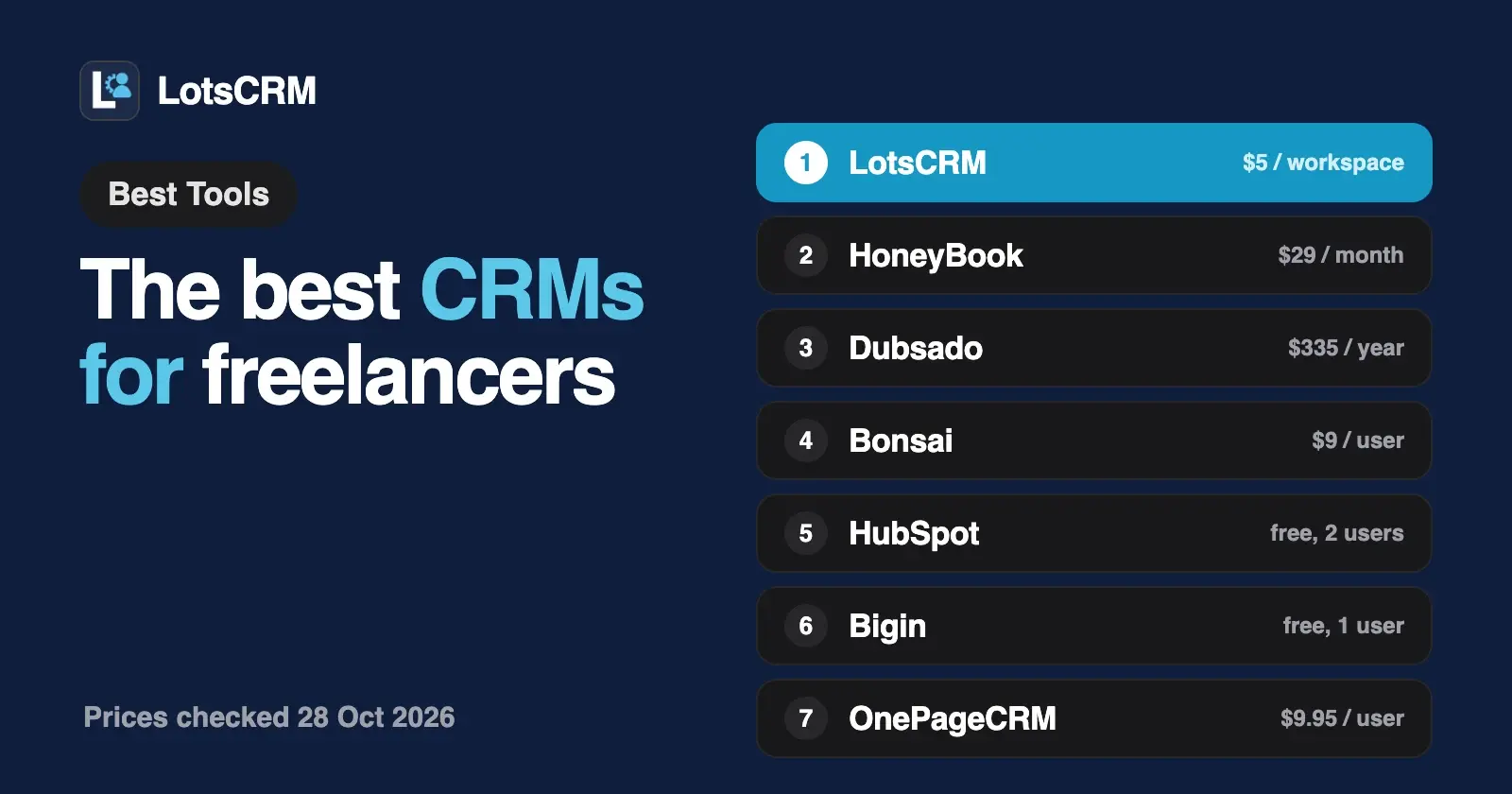
A freelancer needs a CRM that keeps every lead, conversation and follow-up in one place without eating the day. LotsCRM does that for $5 a month for one workspace: your agent or you log the call, and the next step waits in a Today view. If you also want proposals, contracts and invoices in the same tool, HoneyBook, Dubsado and Bonsai bundle them.
Below are eight CRMs for people who sell their own work, LotsCRM first. I opened each vendor's own pricing, feature and AI pages and dated every competitor fact "checked on 28 October 2026". The split that matters is simple: a sales book that tracks who you talked to and what is next, or a client suite that also signs contracts and takes payment.
The best CRMs for freelancers at a glance
| CRM | Built for | What you pay for | Starting price (list) | Free plan or trial | ChatGPT or Claude access |
|---|---|---|---|---|---|
| LotsCRM | A sales book for each business | Each workspace; contacts, deals and teammates unlimited | $5 per workspace a month, or $12 a month for 3 workspaces | Free credits when you sign up, no card, enough to run one workspace for about a month | MCP server and REST API on every plan |
| HoneyBook | Client suite: CRM, proposals, contracts, invoices | Plan tier | $29 a month billed yearly (a limited-time offer is shown on its page) | 30-day trial, no card | ChatGPT connector |
| Dubsado | Client suite: workflows, contracts, invoices | Plan; 3 extra users included | $335 a year ($35 monthly) | 21-day trial, no card | None listed on its pages; Zapier on Premier |
| Bonsai | Client suite plus time tracking and projects | Each user | $9 a user a month billed yearly ($15 monthly); invoices and contracts from $19 ($25) | 7-day trial | MCP connector for Claude, ChatGPT, Gemini and others |
| HubSpot | Broad CRM suite | Seats on paid plans | Free for up to 2 users | Free plan, no time limit | Connectors for Claude and ChatGPT on its remote MCP server |
| Bigin by Zoho | Lightweight pipeline CRM | Each user | Free for 1 user; Express $7 a user a month billed yearly | Free plan; 15-day trial on paid | MCP support |
| OnePageCRM | Next-action CRM | Each user | $9.95 a user a month billed annually ($15 monthly) | 21-day trial, no card | MCP on every plan |
| Less Annoying CRM | One-plan simple CRM | Each user | $15 a user a month | 30-day trial, no card | AppConnect, a connector for Claude and ChatGPT |
Prices are list prices in USD, checked on each vendor's own pages on 28 October 2026, before tax. Annual prices are the monthly equivalent when billed yearly, as each vendor shows them.
What a freelancer needs from a CRM
You sell one thing, your time and skill, to a handful of people at a time. The work comes from conversations: a referral, a reply to a pitch, a client who said "not now" in March and might say yes in October. What goes wrong is rarely the software. It is the follow-up you meant to send, the number you can't find, and the proposal you forgot you made.
- Every conversation on one record. Calls, emails, messages and notes next to the person, so you can pick the thread up in a minute.
- A next step on every lead. A CRM earns its keep when it shows who is due a nudge today.
- A price that suits one person. Per-seat pricing is fine for you alone. It adds up when a partner, an assistant or a subcontractor needs access.
- A decision about the rest of the job. Some freelancers want contracts, invoices and scheduling in the same tool as their leads. Others already have those covered and only need the sales book.
That last point splits this list. HoneyBook, Dubsado and Bonsai are client suites: the CRM comes with proposals, contracts and payments. LotsCRM and the other five are sales CRMs: they keep the record and leave the paperwork to the tools you already use.
1. LotsCRM: the CRM that's easy to keep up to date
LotsCRM is the CRM that's easy to keep up to date: every lead, call, deal and follow-up in one place, updated by you in the dashboard or by ChatGPT or Claude. Nothing updates itself and LotsCRM sends no messages or reminders; you or your agent make the update, and the follow-ups you set wait in one Today view.
Your agent does the typing. LotsCRM works with the AI agent you already use. Connect ChatGPT, Claude, Claude Code, Codex or Cursor to https://api.lotscrm.com/mcp, sign in, and talk to it right after the call:
Log my call with Dana at example.com: she wants a proposal by Friday. Move the deal to Proposal and set a follow-up for Thursday.
Add the 12 people I met at the workshop and tag them "Oct workshop".
Who haven't I followed up with in 30 days, and which proposals are still open?
The agent works with your permissions. Everything it writes shows up in the dashboard, where you can do the same work by hand, and a lead's full history sits on its timeline.
A price that stays put as you grow. You pay per workspace, one per business or client. Contacts, companies, deals, pipelines and teammates are unlimited.
| Option | Price | Workspaces |
|---|---|---|
| Pay as you go | $5 per workspace a month, from credits | As many as you fund |
| Starter | $12 a month or $120 a year | 3 |
| Pro | $29 a month or $290 a year | 10 |
| Business | $79 a month or $790 a year | 30 |
One workspace covers a solo freelance business, so pay as you go is the natural fit. Plans start to pay off if you keep a second book for a side business or sell on behalf of a client. Pro and Business include LotsNotes Pro. New accounts get free credits when they sign up, no card, enough to run one workspace for about a month. Prices from the live catalogue on 28 October 2026; see lotscrm.com/pricing.
Your data stays yours. CSV import and export are built in. If a workspace goes unfunded it turns read-only, you can still read it and export your contacts and companies, and nothing is deleted. More in Is LotsCRM Safe?.
Where others fit better. LotsCRM is the sales book. It doesn't draft contracts, take payments or sync your inbox. If you want those in the same tool, the client suites below do. If you only need invoices, LotsInvoice is our invoicing product for freelancers and small businesses, and it can add a customer from a LotsCRM contact.
Best for: founders and freelancers who sell their own work and want every lead and follow-up in one place, at a price that doesn't grow with the people around them. Connect your agent · LotsCRM for consultants
2. HoneyBook: proposals, contracts and payments with the CRM
HoneyBook is a client suite for service businesses. The CRM, proposals, contracts, invoices, scheduling and a client portal live in one account.
- Price: Starter $29 a month billed yearly, Essentials $49 and Premium $109; its page currently shows a limited-time offer, with $59 and $129 crossed out for the last two. Every plan has unlimited clients and projects, invoices and payments, proposals and contracts, and a client portal.
- Plan gates: Starter includes up to 2 live lead forms. Essentials adds the scheduler, automations and up to 2 team members. Premium adds unlimited team members and multiple companies.
- Trial: 30 days, no credit card.
- Payments: HoneyBook charges processing fees on payments taken through it; see its pricing page.
- AI access: HoneyBook has a ChatGPT connector that can look up clients, invoices and contracts and prepare proposals and invoices; its page says nothing goes out until you approve.
- Availability: HoneyBook says it supports professionals in a short list of countries, so check yours on its pricing page first.
Best for: freelancers who want to book, sign and get paid in one tool and are happy to run the business from a client suite.
3. Dubsado: workflows for a repeatable client process
Dubsado is a client management platform built around workflows: an inquiry comes in, and the proposal, contract, invoice and onboarding steps follow.
- Price: Starter $335 a year and Premier $525 a year; Dubsado's AI information page lists $35 and $55 monthly. Both plans have unlimited clients and projects, invoicing with payment plans, client portals and email integration, and include up to 3 additional users.
- Plan gates: Starter has 1 active lead capture form. Premier adds unlimited forms, scheduling, automated workflows, public proposals, Zapier and bookkeeping integration. Extra brands are $10 a month each.
- Trial: 21 days of the Premier plan, no credit card.
- AI access: the pricing, feature, integration and AI-information pages list no ChatGPT, Claude or MCP connector. Zapier is on Premier.
Best for: freelancers whose client process is the same every time and who want it automated end to end.
4. Bonsai: a client suite that also tracks time and projects
Bonsai spans clients, projects, time tracking and billing, with plans that run from freelancers to enterprise.
- Price per user: Basic $9 a month billed yearly ($15 monthly), Essentials $19 ($25), Premium $29 ($39) and Elite $49 ($59, 3 users minimum).
- Plan gates: Basic has a CRM, time tracking, task management and unlimited clients. Essentials adds invoices and payments, proposals and contracts, forms, scheduling and a client portal. Premium adds a deals pipeline, custom fields and integrations with QuickBooks, Xero, Zapier and Calendly.
- Trial: 7 days.
- AI access: Bonsai MCP connects Claude, ChatGPT, Gemini and other MCP clients, and works within your Bonsai permissions. Bonsai charges payment processing fees; see its help center.
Best for: freelancers who bill by the hour and want time tracking and invoices next to the pipeline.
5. HubSpot: a free CRM for up to 2 users
HubSpot's free CRM suits a freelancer who wants a known name and room to grow.
- Free plan: free for up to 2 users, with 1,000 contacts, no credit card and no time limit.
- Paid plans: priced per seat; read the current figures and any promotion on its pricing page, since they change with billing choices.
- AI access: HubSpot's own connectors for Claude, Microsoft Copilot, Gemini and ChatGPT are powered by its remote MCP server, which can read, write and update records as you would.
- Strength: the wider HubSpot suite, if you later want marketing email or forms in the same account.
Best for: freelancers who want to start free and may grow into more. If the price of growing worries you, see HubSpot alternatives.
6. Bigin by Zoho: a free pipeline for one person
Bigin is Zoho's lightweight CRM for small businesses.
- Free edition: 1 user, 500 records, a single pipeline, contact and activity management, and 3 automations. MCP support is listed among its features.
- Paid price: Express $7, Premier $12 and Bigin 360 $18 a user a month billed yearly. 15-day trial on paid editions.
Best for: a freelancer who wants a free single-user pipeline today.
7. OnePageCRM: built around the next action
OnePageCRM sorts your list by what's due, so each contact has a next action.
- Price: Professional $9.95, Business $19.95 and Max $29.95 a user a month billed annually ($15, $29 and $45 monthly). Unlimited contacts on every plan; one pipeline on Professional.
- Trial: 21 days, no credit card.
- AI access: MCP is included on every plan.
Best for: freelancers whose weak spot is follow-up discipline and who want that habit built into the tool.
8. Less Annoying CRM: one simple price
Less Annoying CRM has one plan with everything included.
- Price: $15 a user a month plus tax: unlimited contacts, companies, pipelines and custom fields, task management, email logging and user permissions. 30-day trial, no card.
- AI access: its integrations page lists AppConnect, which connects Claude and ChatGPT to your CRM. It also lists Zapier, Google Calendar and Outlook Calendar.
Best for: freelancers who want a calm, simple CRM with no tiers to compare.
Also checked
- Capsule has a free plan for up to 2 users with 250 contacts, one sales pipeline and one project board, and a 14-day trial on paid plans. Its AI connectors for ChatGPT and Claude are on Growth and above, and the Claude connector is in beta by request. Paid plan prices are on its pricing page.
If you work with a partner or a small team
When a second person joins your freelance business, per-seat CRMs charge twice and client suites move you to a higher tier (HoneyBook's team members start at Essentials; Dubsado includes 3 extra users). LotsCRM charges for the workspace, so a partner or assistant joins free in the role you pick, from member to read-only viewer. For solo founders weighing the same question, see The Best CRMs for Solo Founders, and for consultants, The Best CRMs for Consultants.
If you run a small studio or sell for clients
A freelancer who grows into a small studio, or who runs sales for a client, needs each client's pipeline kept apart. In LotsCRM that is one workspace per client, with the client's staff invited as read-only viewers. The Pro plan covers 10 workspaces and Business 30. The full walkthrough is in The Best CRMs for Agencies.
How to choose a CRM as a freelancer
- You want every lead and follow-up in one place, updated from ChatGPT or Claude or the dashboard, at one price however many people help: LotsCRM.
- You want to book, sign and get paid in one tool: HoneyBook, Dubsado or Bonsai.
- Your client process is the same every time and you want it automated: Dubsado.
- You bill by the hour and want time tracking beside the pipeline: Bonsai.
- You want a free start: HubSpot (2 users) or Bigin (1 user).
- Follow-up discipline is your weak spot: OnePageCRM.
- You want one plan and no decisions: Less Annoying CRM.
For a wider view of which CRMs let an agent work inside them, see the best CRMs with MCP support and free CRMs with MCP support. Every comparison is on the compare page.
Set up a freelance sales book in LotsCRM from your agent
Connect your agent to https://api.lotscrm.com/mcp (setup for each agent at lotscrm.com/mcp), then give it this:
Read https://lotscrm.com/skill.md. Create a LotsCRM workspace called "My freelance business" with a pipeline: Lead, Intro call, Proposal sent, Won, Lost. Then add the people in this list, tag them "referral", and set a follow-up for each one next week. Show me the list before you add anyone.
The agent creates the workspace and pipeline, adds the people in batches with tags, and sets the follow-ups. After each call, tell it what happened and it logs the activity and moves the deal. You can do all of it in the dashboard too. Coming from a spreadsheet or another CRM? Move to LotsCRM with a CSV import. The call-logging routine is shown end to end in How to Log Every Sales Call in Your CRM Without Typing.
Common questions
What is the best CRM for a freelancer?
It depends on how you work. For a sales book that keeps every lead and follow-up in one place, updated by ChatGPT or Claude or in the dashboard, LotsCRM is $5 a month for one workspace. For proposals, contracts and payments in the same tool, HoneyBook, Dubsado or Bonsai. For a free start, HubSpot or Bigin.
Is there a free CRM for freelancers?
Yes. HubSpot's CRM is free for up to 2 users, Bigin has a free edition for 1 user, and Capsule's free plan covers 2 users and 250 contacts. LotsCRM gives new accounts free credits when they sign up, no card, enough to run one workspace for about a month; one workspace costs $5 a month after that.
Do I need a CRM or a tool like HoneyBook, Dubsado or Bonsai?
If you mainly need to track leads and follow-ups, a CRM is enough. If you also want contracts, invoices and scheduling handled in one place, a client suite like HoneyBook, Dubsado or Bonsai bundles them. You can also pair a light CRM with a separate invoicing tool.
Which freelancer CRM doesn't charge per user?
LotsCRM charges per workspace, with contacts, deals and teammates unlimited. HoneyBook and Dubsado price by plan, with team size limits that rise by tier or add-on, while Bonsai, HubSpot's paid plans, Bigin, OnePageCRM and Less Annoying CRM charge per user.
Can ChatGPT or Claude update my CRM after a client call?
In most of these, yes. LotsCRM, HubSpot, Bigin, OnePageCRM and Bonsai offer MCP access; HoneyBook has a ChatGPT connector; Less Annoying CRM connects through AppConnect. In LotsCRM you tell the agent what happened and it logs the call, moves the deal and sets the next follow-up.
Does LotsCRM send my follow-up emails or reminders?
No. LotsCRM keeps the record: follow-ups you set show up in your Today view, and your agent drafts messages that you send from your own email, then logs them. It never sends messages or reminders itself.
Competitor facts checked on 28 October 2026 on each vendor's own pages: HoneyBook pricing and HoneyBook in ChatGPT; Dubsado pricing, Dubsado AI information, feature overview and integrations; Bonsai pricing and Bonsai MCP; HubSpot free CRM and remote MCP server; Bigin pricing; OnePageCRM pricing; Less Annoying CRM pricing and integrations; Capsule pricing and AI connectors. LotsCRM prices from the live catalogue the same day. Prices and plans change; check each vendor's page before you buy.