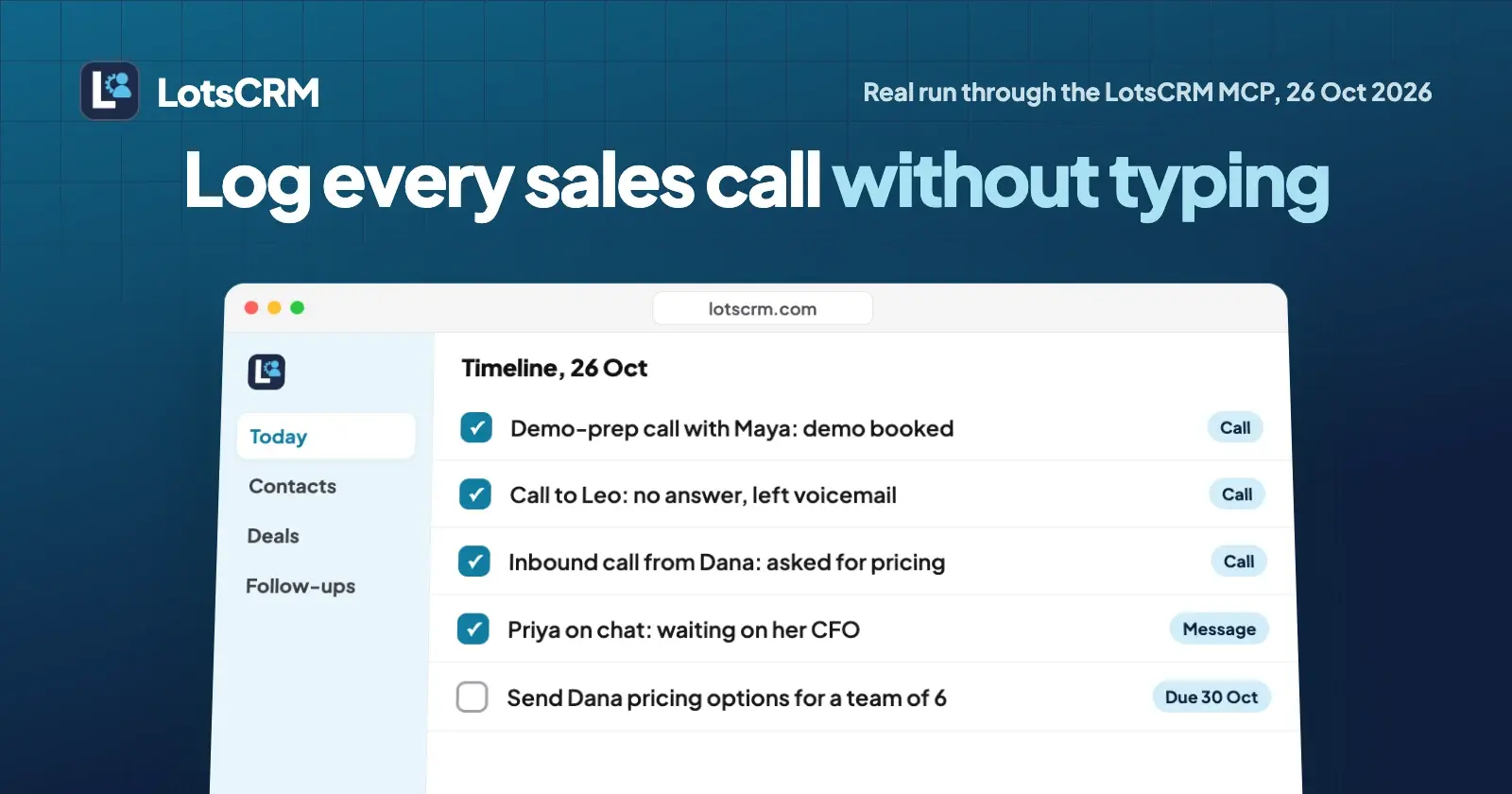
To log every sales call without typing, tell Claude what happened in plain words and let it write the record: who it was, what was said, the outcome and the follow-up you promised. In LotsCRM that is one record_activity call per conversation, and it is on the contact's timeline in the dashboard at once. Below is a real run from 26 October 2026.
Most founders don't skip logging because they don't care. They skip it because the form comes after a call, when the next thing is already waiting. Fifteen minutes of typing at the end of the day turns into "I'll do it tomorrow", and by Friday you can't remember who said what. With LotsCRM, the CRM that's easy to keep up to date, you give your notes to ChatGPT or Claude (typed, dictated or pasted from whatever recorder you use) and it files them. I ran the whole flow from Claude Code through the LotsCRM MCP server, in a throwaway workspace with made-up people at example.com. Nobody real was contacted, and I archived the workspace afterwards. Internal IDs and long text are trimmed below; everything else is what came back.
What you need
- A LotsCRM account. New accounts get 5,000 free credits, valid 90 days, no card, which covers one workspace for about a month. After that it's $5 a workspace a month, or a plan from $12 a month for 3 workspaces (prices from the live catalogue, checked on 26 October 2026; see pricing).
- Claude, Claude Code, ChatGPT or another MCP client with
https://api.lotscrm.com/mcpadded. You sign in with your Lots account and there is no key to paste. Setup for each client is on lotscrm.com/mcp and in how to connect Claude to LotsCRM.
LotsCRM is where the record lives. It doesn't dial, record or transcribe calls, and it never sends anything to a contact. The words come from you.
Step 1: Create a workspace to try it in
Create a LotsCRM workspace called "Blog test: log calls 2026-10-26" in USD.
Claude called create_workspace. A workspace is one business's sales book. It came back ready to use, with a default pipeline of six stages (New 10%, Qualified 30%, Proposal 60%, Negotiation 80%, Won, Lost), and it joined my existing organization. If you own or administer more than one organization, create_workspace stops with ORGANIZATION_REQUIRED, lists them and creates nothing, so name the organization in your prompt.
Then I added three leads to it so the calls had somebody to attach to, and asked Claude to read the briefing first, the way the LotsCRM skill tells an agent to. get_crm_briefing returned my role (owner), the pipeline setup and the counts to watch, all at zero in a new workspace.
Step 2: Paste your notes the way you wrote them
This is the part that replaces the form. I gave Claude four conversations as one rough message, no fields, no order:
Log today's conversations in "Blog test: log calls 2026-10-26":
- Spoke to Maya Testwood at Example Bakery Co for 15 minutes. She runs ops for 4 shops and tracks orders in a spreadsheet. Wants a price for 4 shops before the demo; her co-founder will join. Demo is booked. I promised the price.
- Rang Leo Sampleton, no answer, left a voicemail. Try him again later this week.
- Dana Fixture from Fixture Plumbing called me. Six people, quotes live in a notebook and WhatsApp. Asked what it costs for a team of 6. I'll send options by the end of the week. She's not in the CRM yet.
- Priya Demo replied on chat: likes it, her CFO has to approve any new tool, she'll come back after their finance meeting. Add anyone who's missing, set each person's lead status, and put a follow-up on every promise.
Claude did not guess who the people were. It searched first. search_crm for "Maya" found her record. search_crm for "Dana Fixture" came back empty:
{ "contacts": [], "companies": [], "deals": [] }
So it created her with create_contact, with the company name, the tag inbound-call and the source "inbound call". Setting company_name links the person to a company record in the workspace, created on the spot if it doesn't exist yet.
Step 3: One record per call
For each conversation Claude called record_activity. A call is a call, a chat reply is a message, and the direction says who started it. Here is Maya's, with the long body trimmed:
{
  "activity_type": "call",
  "direction": "outbound",
  "subject": "Demo-prep call with Maya",
  "outcome": "Demo booked for Thursday",
  "body": "15 minutes. Maya runs ops for 4 shops and tracks orders in a spreadsheet. ...",
  "occurred_at": "2026-10-26T03:00:00+00:00",
  "source": "claude"
}
The other three came back the same way:
| Who | Type | Direction | Outcome Claude wrote |
|---|---|---|---|
| Maya Testwood | call | outbound | Demo booked for Thursday |
| Leo Sampleton | call | outbound | No answer, left voicemail |
| Dana Fixture | call | inbound | Asked for pricing, follow up Friday |
| Priya Demo | message | inbound | Waiting on her CFO |
Two details make this safe to run on messy input. occurred_at is when the call happened, not when you logged it, so a catch-up at 6 pm still shows the call at its real time. And every write carries an idempotency_key. I had Claude repeat Leo's voicemail the way an agent might after a dropped connection, and LotsCRM handed back the same activity record with the same id, not a second voicemail on his timeline.
Step 4: Let the status follow the call
Maya is connected now. Leo is attempted. Dana is connected.
Claude used update_contact to set Maya to connected and prospect, and Leo to attempted (reached out, no reply yet). Dana was already created as connected. New leads start as "Not contacted", so a glance at the contact list shows who still needs a first touch and who is mid-conversation.
Step 5: Set the follow-up you just promised
A logged call that ends with "I'll send the price" and no reminder is how promises get dropped. In the same message I'd asked for a follow-up on every promise, so Claude called create_follow_up four times. Dana's looked like this:
{
  "subject": "Send Dana pricing options for a team of 6",
  "priority": "high",
  "due_at": "2026-10-30T04:00:00+00:00",
  "activity_type": "task"
}
A follow-up is a task on your list, linked to the person. It shows up in Today in the dashboard and in list_follow_ups. LotsCRM doesn't email anyone about it, and there's more on that in how to never miss a follow-up.
Step 6: Open a deal, and link the call to it
Maya's demo is booked. Open a deal "Example Bakery Co: 4-shop rollout", $2,400, in Qualified, closing 15 November, with Maya on it.
Claude called create_deal and the deal came back in Qualified (30%), version: 1, with Maya attached.
Then I asked the question this post is really about:
What needs my attention in this workspace?
get_sales_brief answered with one deal and "without_next_step": 1. The deal had no next step even though Maya had a follow-up. The reason is in the data: I'd linked her follow-up to Maya, not to the deal. LotsCRM counts a next step on the deal itself. One call fixed it:
{ "follow_up_id": "...", "deal_id": "..." }
That was update_follow_up with the deal id. I asked for the brief again and without_next_step was 0. The lesson for your prompt: once a deal exists, say "link it to the deal" so the call and the follow-up land on the deal's timeline as well as the person's. In my run Maya's call was logged before the deal existed, so it stayed on her contact timeline, and the deal's timeline started with the follow-up.
Step 7: Ask what was said, from the record
What do I know about Maya?
Claude called get_timeline for her contact:
{
  "activities": [
    { "activity_type": "task", "subject": "Send Maya the 4-shop price", "priority": "high", "due_at": "2026-10-28T04:00:00+00:00" },
    { "activity_type": "call", "direction": "outbound", "subject": "Demo-prep call with Maya", "outcome": "Demo booked for Thursday", "occurred_at": "2026-10-26T03:00:00+00:00" }
  ],
  "count": 2
}
The next time she calls, you open her record and the last conversation is there in full. If you hand the account to a colleague or a first salesperson, so is every one before it.
get_timeline needs a contact, company or deal to read from. Asked for the whole workspace with none of them, it refused with INVALID_PARAMETERS, so name the person or the deal in the prompt.
Step 8: Archive the test workspace
Archive the test workspace.
archive_workspace is owner only and needs the workspace name typed back to confirm:
{
  "archived": true,
  "restore_until": "2026-11-25T05:56:06.528Z",
  "message": "Archived. Nobody can open it now, it stops counting toward your plan from tomorrow (UTC), and nothing in it was deleted. You can restore it until 2026-11-25."
}
Your agent can't hard-delete records in LotsCRM: contacts, deals and workspaces are archived and can be restored. More on that in is LotsCRM safe.
The same thing from the dashboard
The dashboard does the whole job too. Open a contact, a company or a deal and the timeline has a box to log a note, call, email, meeting or message, with direction and an outcome field. Use it when you're already in the dashboard; use your agent when you'd rather say it than click through it. Both write to the same timeline.
The prompt to reuse after every call
Read https://lotscrm.com/skill.md. In my LotsCRM workspace "[name]": [paste your notes from the call or calls]. Find each person first and create anyone who's missing. Log each conversation with the right type and direction and a one-line outcome. Update their lead status. Put a follow-up on everything I promised and link it to the deal if there is one. Don't send anything.
That uses search_crm, create_contact, record_activity, update_contact and create_follow_up. Everything it writes is in the dashboard straight away.
If you're selling alone, see founder-led sales with an AI agent for the whole loop from first lead to follow-up, and the best CRMs for solo founders for the options.
Common questions
Can Claude log my sales calls in my CRM?
Yes. Connect LotsCRM to Claude as an MCP connector at https://api.lotscrm.com/mcp and tell it what happened. It finds or creates the person, records the call with its outcome and direction, updates the lead status and sets the follow-up, all within your role in that workspace. ChatGPT, Claude Code, Codex and Cursor work the same way.
Does LotsCRM record or transcribe my calls?
No. LotsCRM keeps the record of the conversation, not the audio. You give your agent the notes, whether you typed them, dictated them or pasted them from a recorder you already use, and it files them as a call on the timeline.
What if the person isn't in my CRM yet?
The agent searches first. In my run, "Dana Fixture" returned nothing, so Claude created her with her company and a source before logging the call. Contacts are matched by email inside a workspace, so a second import of the same person updates the record instead of making a twin.
What happens if my agent logs the same call twice?
Nothing is duplicated. Every write carries an idempotency key, and repeating the same call returned the same activity record. A genuinely new call gets a new key.
Does LotsCRM email or message my contacts after a call?
No. LotsCRM never sends emails or messages to your contacts, including reminders. It records what happened and schedules your follow-up as a task. If you want a draft, your agent can prepare one from the deal history and you send it yourself.
How much does it cost to log calls in LotsCRM?
New accounts get 5,000 free credits, valid 90 days, no card. After that it's $5 a workspace a month with unlimited contacts, deals and teammates, or Starter at $12 a month for 3 workspaces (checked on 26 October 2026, pricing).
Sources
Real run through the LotsCRM MCP server (https://api.lotscrm.com/mcp) from Claude Code on 26 October 2026, in a test workspace with fictional people at example.com; the workspace was archived afterwards. LotsCRM: pricing, MCP setup, agent skill, tool list, API docs.