A weighted pipeline forecast multiplies each open deal's amount by the chance of winning it, then adds the results up. A $10,000 deal at 60% counts as $6,000. Do that for every open deal and the total is a more honest number than the raw pipeline, because it admits that most early-stage deals will not close.
Below is the method, how to set the percentages without guessing, and a worked example with numbers from a real run: I put ten fictional deals into a throwaway LotsCRM workspace through its MCP connection today and read back exactly what the product returns.
The method in one line
Weighted forecast = sum of (deal amount × win probability) across your open deals.
The win probability usually comes from the stage the deal is in. A deal in New might carry 10%, one in Negotiation 80%. Won deals are already revenue, and lost deals are zero, so neither belongs in the forecast of what is still open.
Use it when you have enough deals that the law of averages works: roughly a dozen or more open deals, or a pipeline where no single deal is most of the value. With three big deals, a weighted number is just a polite guess for each one, and you are better off talking about each deal by name.
Worked example from a real run
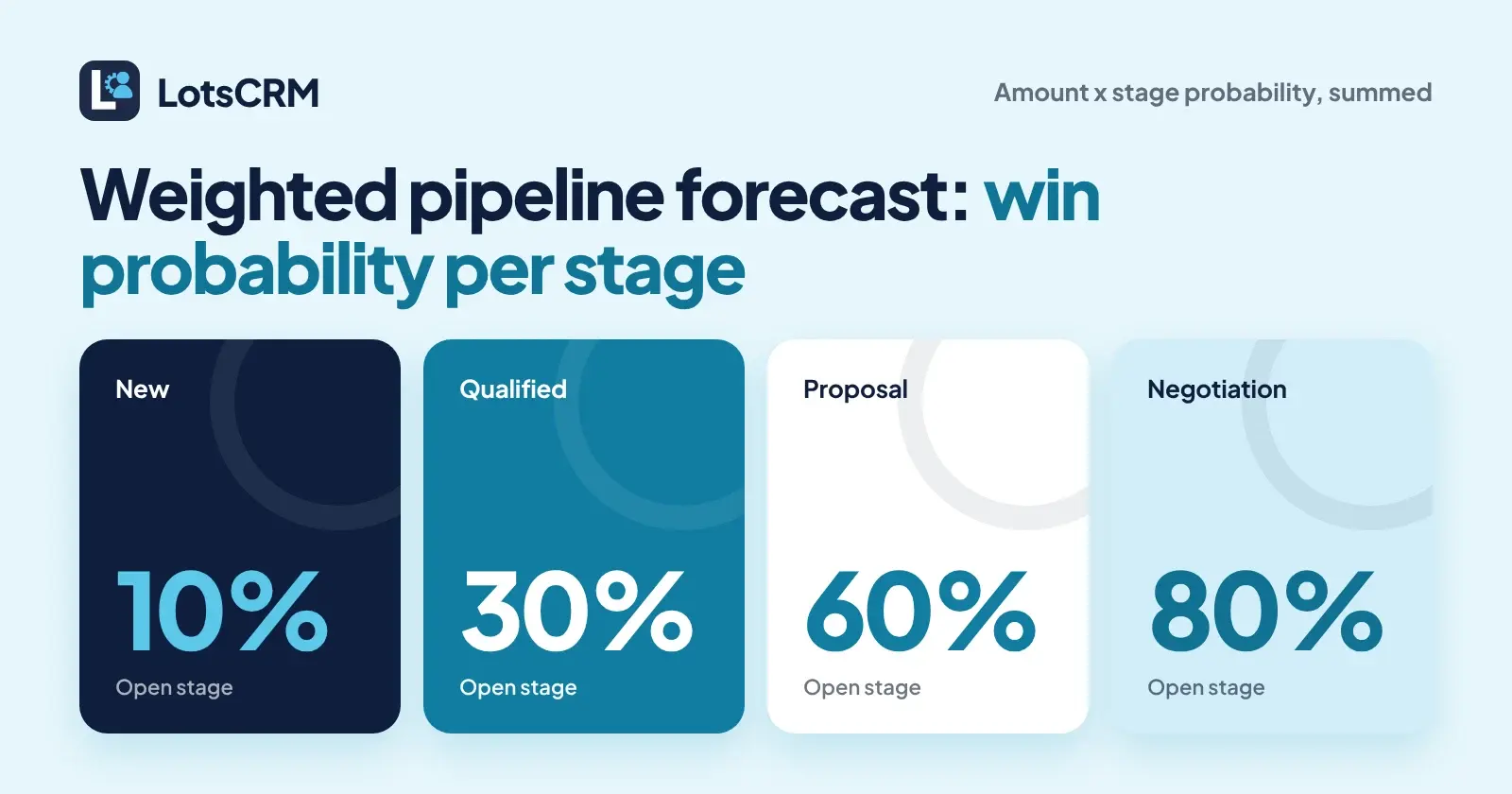
I used a temporary LotsCRM workspace with a default pipeline whose stages carried these win probabilities: New 10%, Qualified 30%, Proposal 60%, Negotiation 80%, Won 100%, Lost 0%. I created ten example companies and ten deals (all on example.com style data, no real people), spread across the open stages, and then asked the product for the pipeline summary.
Here are the eight deals that were still open after I closed two of them:
| Deal | Stage | Amount | Stage probability | Weighted |
|---|---|---|---|---|
| Northwind Bakery: website and ordering setup | New | $4,000 | 10% | $400 |
| Harbor Dental: patient reminders project | New | $2,500 | 10% | $250 |
| Pine Street Studio: brand refresh | Qualified | $6,000 | 30% | $1,800 |
| Maple Fitness: membership system rollout | Qualified | $9,000 | 30% | $2,700 |
| Bluebird Cafes: multi-site signage | Proposal | $12,000 | 60% | $7,200 |
| Orchard Legal: document automation | Proposal | $5,000 | 60% | $3,000 |
| Summit Roofing: fleet scheduling contract | Negotiation | $20,000 | 80% | $16,000 |
| Lakeside Vet Clinic: booking portal | Negotiation | $8,000 | 80% | $6,400 |
| Total | $66,500 | $37,750 |
My hand calculation says $37,750 weighted against $66,500 of raw open pipeline. Before I closed any deals, the product's pipeline summary for the ten open deals returned $42,850 weighted, which matched my hand sum for those ten deals exactly (the extra $5,100 was a $7,000 Proposal deal at 60% and a $3,000 Qualified deal at 30%, both closed later).
What LotsCRM returned
I read the pipeline summary after each change. This is exactly what comes back, and nothing more:
- Per stage: the stage name, its probability, the number of deals, and totals per currency with both
amount(raw) andweighted_amount. Currencies are kept separate, never mixed. - Won stage: I moved one $7,000 deal to Won. The Won row returned $7,000 amount and $7,000 weighted (100%).
- Lost stage: I moved one $3,000 deal to Lost, which required a lost reason. The Lost row returned $3,000 amount and $0 weighted.
- Per-deal override: a deal has its own probability field, which is empty by default. I set Summit Roofing to 50%, and the Negotiation row's weighted amount changed from $22,400 to $16,400 ($20,000 × 50% plus $8,000 × 80%). So a deal-level probability wins over the stage's.
- No grand total row: the summary lists stages, so I added the open rows myself: $650 + $4,500 + $10,200 + $16,400 = $31,750. That is the forecast with Summit Roofing at 50% instead of 80%.
That one override moved the forecast from $37,750 to $31,750, about 16% lower, because a single $20,000 deal was 42% of the stage-weighted number. This is the practical lesson of the run: look at which deals carry your forecast, not only at the total.
| Stage | Open deals | Raw amount | Probability | Weighted (returned) |
|---|---|---|---|---|
| New | 2 | $6,500 | 10% | $650 |
| Qualified | 2 | $15,000 | 30% | $4,500 |
| Proposal | 2 | $17,000 | 60% | $10,200 |
| Negotiation | 2 | $28,000 | 80%, one deal set to 50% | $16,400 |
| Open total (my sum) | 8 | $66,500 | $31,750 | |
| Won | 1 | $7,000 | 100% | $7,000 |
| Lost | 1 | $3,000 | 0% | $0 |
Report the Won row separately as revenue you already have. If you add it into the open total you are forecasting money that is already in the bank.
How CRMs define it
Two checks on the vendors' own pages, so you can compare notes if you use one of them:
- HubSpot defines Weighted amount as the Amount multiplied by the Deal probability, and the forecast tool can use it as the deal amount. Deal probability is set automatically when a deal moves to a new stage, from the win probability configured for that stage; if you edit a deal's probability by hand, it stops updating automatically from the stage.
- Pipedrive applies the same idea: weighted value is the deal's total value times its probability. Deal probability, when set, takes priority over stage probability, and the pipeline view shows total value and total weighted value at the top.
Checked on 3 November 2026. Sources: https://knowledge.hubspot.com/properties/hubspots-default-deal-properties and https://support.pipedrive.com/en/article/probability-in-pipedrive
Same maths in both, same override rule as the run above. The method is not product-specific; what matters is the percentages you feed it.
Set honest probabilities from your own win history
Do not trust a stage default blindly. A stage percentage is somebody's guess about a typical sales team, not yours. Here is how to replace the guess with your own numbers:
- List your last 20 to 30 closed deals, won and lost.
- For each stage, count how many of those deals ever reached it.
- Of those, count how many ended up won.
- Win probability for the stage = won ÷ reached.
For illustration: if 20 closed deals reached Proposal and 9 of them were won, your Proposal probability is 45%, not 60%. If you only ever win 1 in 10 deals that sit in New, 10% is fair; if it is 1 in 20, use 5%.
Two honesty rules:
- Use closed deals only. Deals still open are neither wins nor losses yet, and counting them as losses (or wins) skews every stage.
- Re-do it every quarter. Your win rates change when your offer, your price or your lead source changes. A probability from last year is the same kind of guess as a default.
If you have fewer than 20 closed deals, keep the stage numbers rough and treat the weighted total as a range, not a promise.
How stale deals distort the number
A weighted forecast is only as good as the stage each deal is really in. A deal that went quiet six weeks ago but still says Negotiation counts as 80% of its value. Multiply that by a few forgotten deals and the forecast is fiction.
In the run above, Summit Roofing alone was $16,000 of the stage-weighted total. If that buyer has gone silent, the true weight is far lower than 80%, and you would not know from the total.
Two fixes: move quiet deals back a stage (or set a lower deal-level probability, as I did with Summit), or close them as lost with a reason.
The quiet-deals check
Before you quote a weighted number to anyone, run this check:
- List open deals by last activity, oldest first.
- Flag anything untouched for 7 days or more.
- For each flagged deal, decide: real next step, drop a stage, or close as lost.
- Check that every open deal has an expected close date and a next step.
LotsCRM's briefing does the listing for you. I asked for the CRM briefing in the same test workspace, and it returned counts of open deals, overdue follow-ups, stale deals, deals closing soon and deals without a next step, plus the deals behind each count. The stale rule in that workspace was 7 days, and you can pass a different number of days when you ask. Because I had just created the deals, stale was 0 and all ten open deals showed as having no next step. In your own pipeline, the stale and no-next-step lists are the ones to work through before you trust the total.
LotsCRM does not send messages or reminders itself. It tells you which deals need attention; you or your agent decide what to do about it. A forecast stays believable only if the deals underneath it are kept current, so keep the update step small.
A prompt to paste into ChatGPT or Claude
If your CRM is connected to ChatGPT or Claude (see how to connect Claude to a CRM), paste this:
Build my weighted pipeline forecast from my open deals.

1. List every open deal with its amount, stage, stage probability, any deal-level probability, last activity date and expected close date.
2. Weighted value per deal = amount × deal probability if set, otherwise amount × stage probability. Leave out Won and Lost.
3. Show a table by stage (deal count, raw amount, weighted amount) and the open total, per currency. Do not mix currencies.
4. Show the three deals that contribute the most to the weighted total and what share of the total they make up.
5. List deals with no activity for 7 days or more, deals with no next step, and deals past their expected close date. For each, say whether to keep the stage, move it back, or close it as lost, and why.
6. Then show the forecast again with the deals from step 5 moved back one stage, so I can see the difference.

Do not change any deal until I say so. Do not send any message.
If you run an agency
The same method works per client or per service line. Keep one pipeline per kind of work, because a retainer and a one-off project have different win rates, and give each its own stage probabilities from its own history. Mixing them in one pipeline gives you one blurry percentage that is wrong for both.
FAQ
What is a weighted pipeline forecast?
It is the sum of each open deal's amount multiplied by its probability of closing. A $10,000 deal at 60% adds $6,000. The total estimates the revenue your open pipeline is likely to produce, which is lower and more honest than the raw total.
How do I choose win probabilities for each stage?
Count how many of your past closed deals reached each stage and how many of those were won. Won divided by reached is that stage's probability. Use closed deals only, and redo it every quarter.
Should I trust my CRM's default stage probabilities?
Treat them as a starting point only. They are generic guesses. Replace them with your own win rates as soon as you have 20 or more closed deals, and check them again as your offer or lead source changes.
Should won and lost deals be in the weighted forecast?
No. Won deals are revenue you already have, so show them separately. Lost deals are worth zero. In my LotsCRM run the Won row returned its full $7,000 as weighted and the Lost row returned $0, so use only the open stages for the forecast.
How do stale deals affect the forecast?
A deal that has gone quiet but still sits in a late stage keeps its high percentage, which inflates the total. Check for deals with no recent activity or next step, then move them back a stage, lower their probability or close them as lost.
Try it on your own pipeline
LotsCRM is the CRM that's easy to keep up to date, which is what keeps a weighted forecast honest. For more on running sales from your agent, see founder-led sales with an AI agent and the best CRM for a small business.